Firmware Updates - List View
Definition
Firmware Updates (List View) is an area of myExpert that serves to manage firmware updates. The components of a plant are displayed in a list view.
Structure
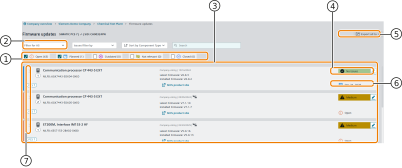
| No. | Object | Description |
|---|---|---|
| 1 | Filter by Associated System | Serves to support planning for plant sections or partial shutdowns. The filter restricts the listing to components associated with the filtered system. |
| 2 | Notifications | Button. Subscribes to notifications regarding firmware updates. |
| 3 | Filter by Issue Status | Offers the possibility to filter the view by different states of the issues. The number of displayed issues and states corresponds to the filter and search settings made. |
| 4 | Export | Button. Exports all plant items (including all details) for the current issue of a category. The storage is in Excel format. The function supports planning and execution outside of myExpert. |
| 5 | Grouped Issues | Contains information on the component type, its article number, and quantity. Also included are: plant name, actual and target version, and the number of affected components. |
| 6 | Detail View | Button. Opens the detail view of the grouped issue. |
| 7 | Recommended Action | Contains a recommended action for the subject of the issue (e.g., update instructions) and a urgency recommendation. |
| 8 | Planning Status | Indicates the status of the grouped issues. |