Operating the myExpert User Interface
Reference is made below to:
- Structure of the user interface
- Login or settings
Structure of the user interface
The user interface contains the following elements:
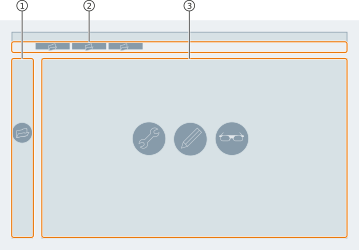
| No. | Object | Description |
|---|---|---|
| 1 | Sidebar | The sidebar is the navigation area of the website. Sidebar |
| 2 | Breadcrumb | Breadcrumb provides access to the navigation history. Breadcrumb |
| 3 | Workspace | The workspace displays the currently open page. Company overview myCompany myPlant Management services Contract view |
Login or settings
You can change your login (user profile) as follows:
Log In User
Log Out User
You can adjust the language for myExpert as follows:
Change language