Inventory Workflow
myExpert uses various stages to achieve added value in the application.
In the course of the following sections, the term "issue" comes up. "Issue" describes a general need for action regarding an inventory item (plant item or "asset") of your plant.
Example: A firmware update is necessary for an assembly. The update requirement can be evaluated, planned, and tracked via the issue.
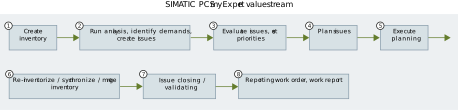
Inventory (Import of Plant Item)
After uploading the inventory files, the plant inventory provides the user with an overview of all recorded hardware and software components (plant items) of their plant. The inventory forms the basis for all lifecycle analyses, the optional Health functions, and also the creation of support requests (SR).
Inventory data is recorded per plant and contributes to the creation of the company inventory. If the inventory is updated by uploading new inventory files, the contained project data and plant items are recognized, updated, supplemented, or removed if no longer present.
Further information can be found in the installation manual "SIMATIC PCS myExpert".
Need for Action (Issue Analysis)
Based on a project inventory, a corresponding analysis of the associated product data is carried out. This compares data on the product lifecycle and known vulnerabilities from IT and OT.
Example
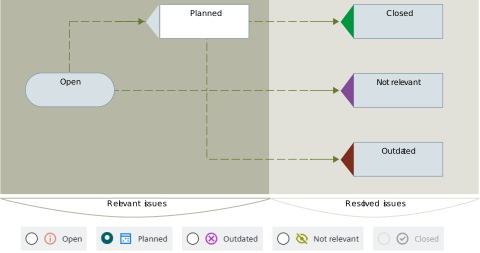
There is a more recent firmware version for a hardware component. Its detected deviation is recorded as a requirement (issue) and subsequently offered for processing and tracking in the "Lifecycle Management" area. myExpert generates several issues for your plant inventory. These are mapped in the "Issue Status" model.
Recommended Action (Issue Prioritization)
The resulting issues can be provided with advice and priorities. These, in turn, can be displayed in issue management and used for planning.
Example
The consultation and weighting of issues (regarding updates, obsolescence, or potential vulnerabilities) can be carried out by a service provider or a specialist department. This enables optimal support for the maintenance planning of a customer's plant.
Priorities
The following priorities exist.

| Priority | Description |
|---|---|
| 1 – Urgent | Action required as soon as possible. |
| 2 – Recommended | Action required at the next opportunity. |
| 3 – No Issue | No action required. |
| 4 – N.A. | Not assessed |
Measures (Issue Planning)
In the planning step, pending issues are assessed and planned. This can be done by a Siemens service unit or by specialist experts on the customer side, depending on the agreement. Various roles (with a focus on their area of responsibility, evaluation, planning, and execution) can arise here.
The current planning status can be exported in Excel format based on the existing issues and associated plant items. The goal is to evaluate the existing issues and bring them to a final state. This can mean that a matter has been completed, is not relevant, or has been superseded by a more recent one.
| Status (English) | Description |
|---|---|
| Open | Default value automatically set by the system for new issues. |
| Planned | Resolving the issue is planned, e.g., by upgrading the firmware to the target version. |
| Outdated | Planned update issues for which a higher target version is offered before their execution automatically receive this status from the system. |
| Not relevant | All issues that have been evaluated accordingly and manually set to "Not relevant". |
| Closed | All issues for which a renewed analysis of the plant inventory has shown that the target version has been reached receive this status from the system. |
In principle, existing issues can switch between different states. This can happen automatically through myExpert as a result of an inventory update or through manual interaction by the user. For example, myExpert automatically closes version-dependent issues such as software or firmware update issues as soon as at least the planned version has been installed and is included in the currently imported inventory for the affected plant item.
Execution (Issue Export)
For the execution of planned maintenance and care tasks from myExpert, lists of affected plant items can be exported from myExpert and transferred to subsequent work steps.
Inventory Update (Consolidate Inventory)
After the planned maintenance work has been carried out, the plant inventory should be recreated and imported into myExpert. If this is neglected, no update of the issues in myExpert can take place based on the current status of a plant.
Control (Issue Finalization)
By updating the inventory, the displayed issues are automatically checked and updated.
Example
An update is carried out. The version comparison leads to the closing of the issue and a corresponding comment in the issue's comment field. All automatically performed status changes (in the issues) are automatically commented on by myExpert and can be tracked by the users.
Reporting (This function is not yet released)
An overview and summary of current statuses can be a prerequisite for budget planning, task prioritization and assessment, or the commissioning of service providers, among other things. myExpert offers a basic report for this, which summarizes essential points and presents them clearly. In addition, this can be provided as a PDF file for further work steps. The basic report can be supplemented with exports on the planning status of the existing issue details.