Definition
The sidebar is an area of the "SIMATIC PCS myExpert" website that serves for navigation. This area offers administrative functions in addition to hierarchical navigation.
Structure
The sidebar is structured as follows:
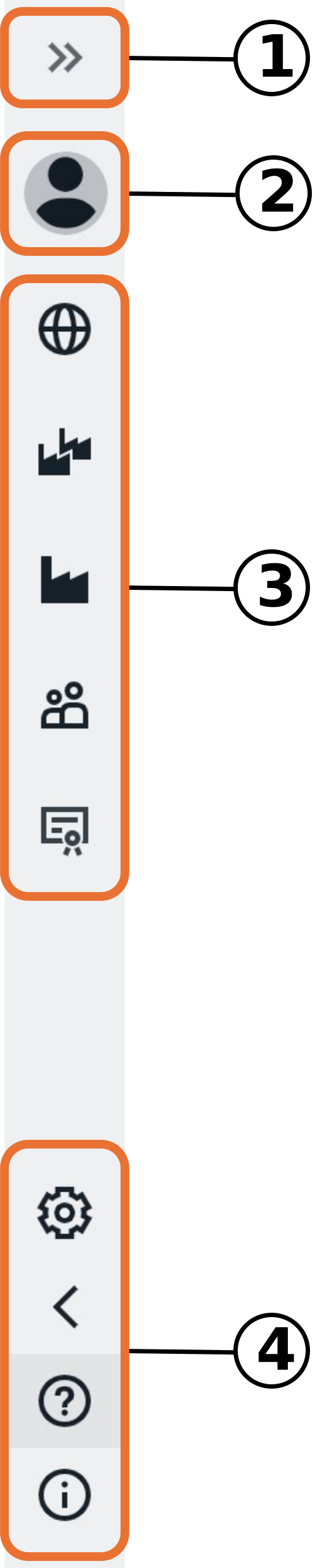
| No. |
Object |
Description |
| 1 |
Expand Menu |
Expands or collapses the display of the sidebar. |
| 2 |
Profile Links |
Consists of: - "User Profile": Link. Redirects to the "Siemens ID Service Portal".
- "Logout": Button. Used to log out the logged-in user. Subsequently displays the login page.
- "Request demo access": Offers Siemens personal the possibility to request the access to a demo project.
|
| 3 |
Company and Plant Management |
These operational links serve for direct navigation. They help to quickly reach and switch between the different functional levels of SIMATIC PCS myExpert.
Company Overview
myCompany
myPlant
Management Services
Contract view |
| 4 |
Settings & Support |
Extended links consist of: - "Settings": Button. Opens the "Settings" submenu. Used to change the display language (English and German) or the theme (from Light Mode to Dark Mode).
- "my SIMATIC PCS neo": Link. Refers to the website of the same name.
Portal "my SIMATIC PCS neo" - "Help for myExpert": Provides answers to frequently asked questions, download of the installation and operating manual, contact details for support and the possibility for feature requests.
- "About & legal information": General and legal information about the website, including release notes of the website.
|