Software Updates - List View
Definition
Software Updates (List View) is an area of myExpert that serves to manage software updates. The software components of a B&B station (or plant) are displayed in a list view.
Structure
Software Updates (List View) is structured as follows:
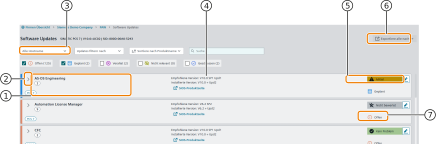
| No. | Object | Description |
|---|---|---|
| 1 | Software Type and Quantity | Shows the type of software. The quantity indicates the frequency of use on a plant. |
| 2 | Detail View | Button. Opens the detail view of the grouped issue. |
| 3 | Filter by Hostname | Reduces the list to software installed on the searched host. |
| 4 | Software Version | Shows the installed and recommended version of a software. |
| 5 | Recommended Action | Contains a recommended action for the subject of the issue (e.g., update instructions) and a urgency recommendation. |
| 6 | Export | Button. Exports all plant items (including all details) for the current issue of a category. The storage is in Excel format. The function supports planning and execution outside of myExpert. |
| 7 | Planning Status | Indicates the status of the grouped issues. |