myPlant
Definition
myPlant is an area of myExpert that provides information on Plant Inventory, Lifecycle, Service and Health (license dependent) of a selected plant. myPlant represents the lowest level of myExpert's hierarchical navigation.
Structure
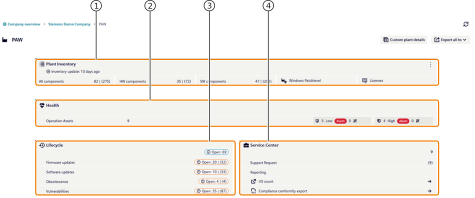
myPlant is structured as follows:
| No. | Object | Description |
|---|---|---|
| 1 | Inventory | Provides an overview of the number of installed hardware and software components within a plant. The individual tiles are buttons. These are linked to a correspondingly pre-filtered detailed view of the inventory. The displayed number describes the quantity of hardware or software components (plant items) stored in the inventory. Furthermore, plant items of the same product are grouped and can be detailed again. Plant Inventory - List View Plant Inventory - Detail View |
| 2 | Health | Provides an overview of the status and the systems integrated into the Health concept of the plant. Identified problems with individual device components (CPU load, RAM usage, HDD utilization, etc.) or the status of Windows Defender are displayed according to the traffic light principle. The displayed number indicates the number of systems that are conspicuous under the given criteria. System Events - List View System Events - Detail View |
| 3 | Lifecycle | Provides an overview of the identified lifecycle and security issues of the plant. In the areas of "Firmware Updates", "Software Updates", "Obsolescence", and "Vulnerabilities", issues are described, managed, and tracked. The displayed number describes the number of affected plant items with problems in "Open" status. Firmware Updates - List View Firmware Updates - Detail View Software Updates - List View Software Updates - Detail View Obsolescence - List View Obsolescence - Detail View Vulnerabilities - List View Vulnerabilities - Detail View |
| 4 | Service | Provides an overview of available service and support topics. In the "Support Requests" area, support requests can be created, supplemented, viewed, and tracked by all authorized users of this plant. The displayed number indicates the number of support requests currently being processed for this plant. Support Request - List View Support Request - Detail View |
counting in myExpert
Throughout the SIMATIC PCS myExpert application, you'll encounter a unique way of displaying counts and quantities. This approach uses a two-part format, where the first number represents the count of distinct types or categories, and the second number (in parentheses) represents the total count of instances or occurrences. For example, let's say you're viewing the plant inventory, and you see the following:
Automation Systems: 2 | (15)
This means that there are 2 distinct types of automation systems (a type in this context is always one distinct MLFB), and the total number of automation system instances is 15.